
This lesson belongs in The Basics, where the core mechanics should be understood before they are used in a trading decision.
There is no universal answer to what happens when your computer, internet connection, trading platform, broker connection, or exchange access fails. A futures trade can involve several separate layers: the open position, orders already accepted elsewhere, broker- or server-managed logic, and instructions that still depend on your local software. The useful question is therefore not simply “Will my stop still work?” but “Where does each part of my trade live after my computer disappears?”
That belongs in the broader ETM lessons under The Basics → Price, Orders & Market Activity because infrastructure is part of execution. A good strategy can still create serious risk if the trader does not understand what happens to positions, orders, and automation during an interruption. DISCONNECT ≠ ONE UNIVERSAL OUTCOME.
Your Screen Is Not Your Position
Suppose you are long one ES contract and your platform disconnects. The position does not automatically close because the chart vanished; the account can remain long while your local screen is unavailable. SCREEN STATE ≠ ACCOUNT STATE.
An open position and a working stop are separate facts, so one can exist without the other. Closing a chart window, losing Wi-Fi, or shutting down a computer does not by itself tell you whether the account is long, short, flat, protected, or exposed. The first outage question is therefore: What position and orders actually exist right now?
The Three Places an Order or Instruction Can Live
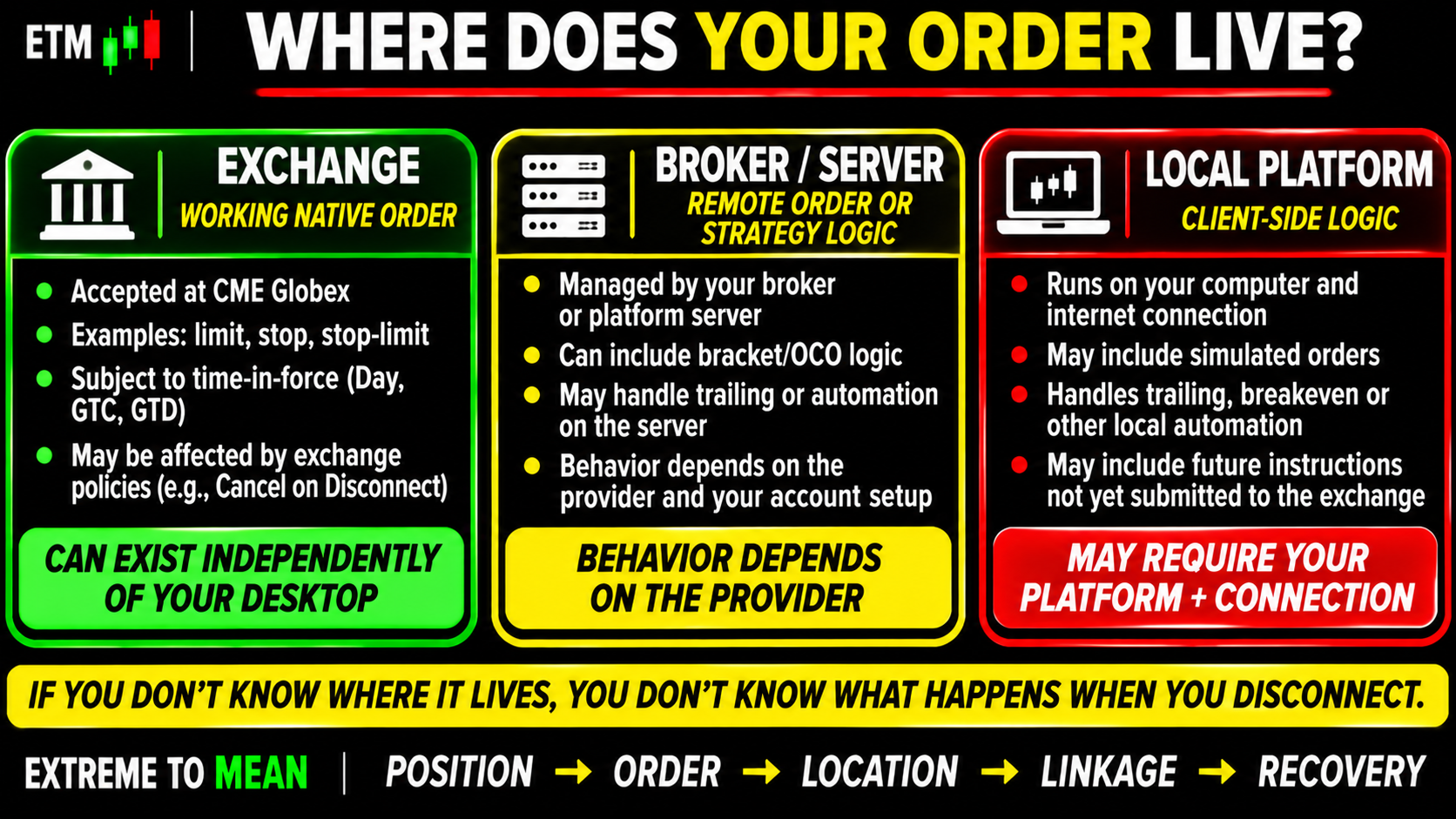
A useful model has three levels: EXCHANGE, BROKER / SERVER, and LOCAL PLATFORM. An order already accepted by CME Globex may be working remotely; a broker or platform server may manage other order relationships or synthetic logic; and some automation may still depend on your desktop application and connection. That distinction is the starting point.
A submitted order and an unsent instruction are not the same thing. If your computer intended to create a stop later, but local logic never transmitted it before the failure, there may be no protective order anywhere else. An order that has been submitted can survive somewhere else. An instruction your computer has not submitted yet cannot.
The chart icon cannot answer residency by itself. Two stops can look identical while one is a native remote order and another depends on simulated or locally managed logic. The word “stop” describes an intent; the implementation determines the failure mode.
Exchange Residency Still Does Not Answer Everything
Reaching the exchange does not automatically mean an order will remain through every disconnect. CME Globex supports Cancel on Disconnect, which can cancel certain resting futures and options orders when a routing connection is involuntarily lost; current CME documentation excludes GTC and GTD orders from that particular COD behavior. So exchange residency is only one variable.
Time-in-force is a separate question. A Day order generally remains only for the applicable trading day, while a GTC order is designed to remain until execution or cancellation, subject to the applicable rules and contract lifecycle. Order location tells you where it lives; time-in-force tells you how long it is intended to live; disconnect policy is another dimension.
Before assuming anything, ask: Where is the order? How long is it valid? What happens if the relevant connection fails?
The Order Can Survive While the Automation Does Not
Consider an initial protective stop already working remotely and a rule that says, “After +10 points, move the stop to breakeven.” Those are not necessarily one piece of infrastructure. The stop may remain active while the logic responsible for modifying it no longer runs.
Trailing stops create the same issue. One configuration may calculate and transmit each adjustment from the desktop, while another may manage more of the logic remotely. A stop can remain alive while its intelligence stops moving.
Current NinjaTrader documentation, for example, distinguishes server-side and local ATM implementations. The lesson is not to prefer one product; it is to verify your own configuration rather than assume every bracket, trail, or breakeven rule survives the same failure. Architecture matters more than the label on the screen.
A Bracket Is Multiple Orders Plus Linkage
A typical bracket can contain an entry, protective stop, and profit target. The stop and target may be linked through OCO—One Cancels Other—logic, so a full fill of one exit is intended to cancel the other. But the orders and the relationship connecting them are separate pieces of the system.
CME Direct, for example, supports OCO-linked orders and documents that a full fill of one linked order cancels or holds the others, while a partial fill does not automatically cancel the linked orders in that implementation. TWO EXIT ORDERS ≠ GUARANTEED OCO LINKAGE. Partial fills make quantity management part of the risk.
This is where orphaned-order risk appears. If you manually flatten a long NQ position through a backup method but an old sell target remains working, that target can later fill and create an unintended short. An exit order can become an entry order after the position it was supposed to exit no longer exists. Operational risk begins when the real account state and the state you think you are in stop matching.
Do Not Blindly Replace an Order You Cannot Confirm
A disconnected trader may assume the stop vanished, log in from a phone, and place another one. If the original stop is still working, two sell stops may now protect one long contract; the first can flatten the position and the second can later create a short. Duplicate protection can become a new position.
The same rule applies to cancellations and modifications. Clicking Cancel or dragging a stop before the connection fails does not prove the command reached the system and was accepted. CANCEL REQUEST ≠ CANCEL CONFIRMATION, so recover the truth before sending the next command.
The Part of the Chain That Failed Matters
A home-internet failure can leave the broker, platform servers, exchange, and remote orders functioning while only the trader goes blind. A local platform crash can occur while the internet and exchange remain healthy, and a broker-routing disconnect can invoke different order-management behavior again. Platform failure and market failure are not the same event.
Think in layers: DEVICE → CONNECTION → BROKER / PLATFORM → EXCHANGE. “The platform is down” is not a diagnosis. Identify the failed layer first.
When the Screen Goes Dark: Recover State Before Strategy
During an outage, do not trust a frozen chart. The exchange may have processed orders while your local application never received the update, so execution reality does not wait for your platform to receive the message. Use an independent approved access path if one is available and safe to use.
Then verify three things in order: actual position, actual working orders, and fills that occurred during the interruption. Only after those facts are known should you decide whether another order needs to be placed, canceled, or modified. Position first. Orders second. Strategy third.
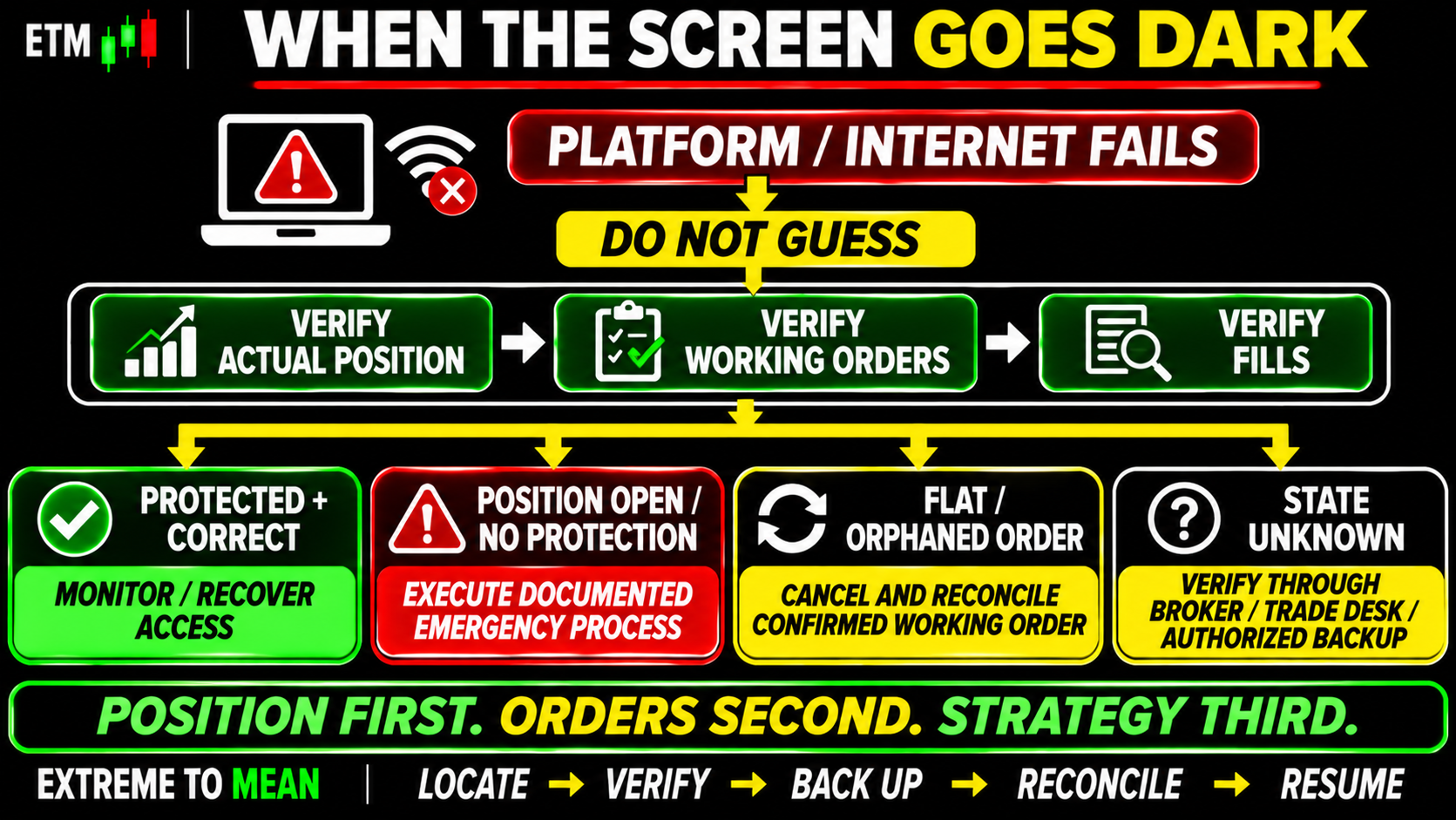
This sequence helps prevent recovery from creating a second problem. After reconnecting, reconcile the account before reconciling the chart. RECONNECTION ≠ RECONCILIATION.
Build the Backup Plan Before the Outage
A backup device helps only if you can actually use it. Before trading live, know how to access authoritative account information through another approved channel, where to find positions and working orders, and how to contact the broker or trade desk if normal access fails.
Keep support information available through a secure independent method without exposing passwords or authentication secrets. Practice the recovery interface during calm conditions. A backup device you have never practiced using is only theoretical redundancy.
This belongs in a trading plan made before the session. The emergency process is part of preparation, not something to invent after connectivity fails.
The Infrastructure-Failure Checklist
Before trading live, make sure you can answer:
- Where does my protective stop reside after submission?
- Is it native, simulated, or another provider-specific implementation?
- Where is my bracket or OCO relationship managed?
- What happens to working orders if my connection drops?
- Does Cancel on Disconnect apply to my routing setup?
- What is the time-in-force of each important order?
- What happens to trailing, breakeven, or other automation if the platform closes?
- Can I verify position and orders through a second approved access path?
- How do I contact my broker or trade desk during an emergency?
- Could an emergency manual exit leave old stop or target orders working?
- Do I know how to review fills after reconnecting?
- Have I tested the recovery procedure in a safe environment?
These questions determine whether the risk plan on the screen corresponds to actual working protection. That is why the trade is not ready until the risk is clear applies to infrastructure as well as price.
The ETM Locate → Verify → Back Up → Reconcile → Resume Framework
Use LOCATE → VERIFY → BACK UP → RECONCILE → RESUME. LOCATE where stops, targets, and automation live; VERIFY what each component should do during a failure; BACK UP the normal access path with a tested independent route. RECONCILE position, working orders, and fills after an interruption, then RESUME only once actual account state is known.
The ETM free tools can help organize preparation, but they cannot replace understanding the actual broker and platform configuration. DESCRIBE THE QUESTIONS THE TRADER MUST VERIFY—NOT UNIVERSAL PLATFORM BEHAVIOR. Operational risk is trading risk—even when the market did nothing unusual.
Final Thought
If your futures platform or internet connection goes down, your open position does not disappear simply because your screen does. Orders already accepted elsewhere may continue working, local automation may stop, and disconnect policies can change what happens even to remote orders.
Bracket trades add another layer because the stop, target, OCO relationship, and automation modifying them may not all live in the same place. A stop can survive while trailing logic stops updating; a position can remain without protection; or an old exit order can survive after the original position is gone and later create an unintended new trade.
The solution is not memorizing one universal platform rule. Know where each part of the trade lives, know what your provider says happens on disconnection, maintain a tested backup access path, and reconcile the account before sending new commands.
Your screen is not the market. Recover the truth first: position first, orders second, strategy third.
Educational content only. Trading involves substantial risk and is not suitable for everyone.