
Price Touched My Order—So Why Didn't I Fill?
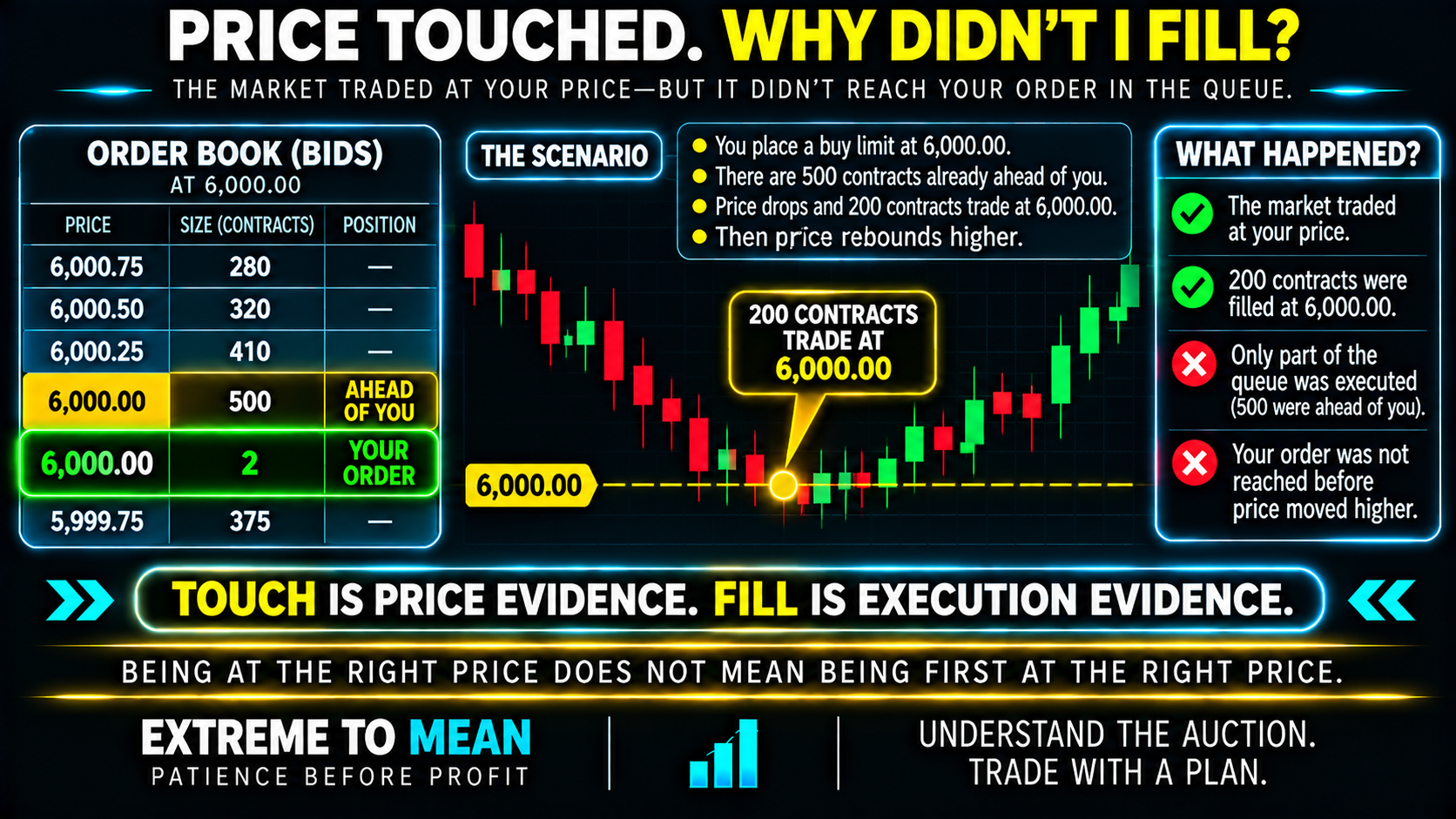
Suppose MES is trading above 6,000.00 and you place a resting buy limit at 5,999.00. There are already 600 contracts waiting to buy at that price before your order, then the market falls and only 150 contracts trade at 5,999.00 before price rebounds. The chart correctly shows that 5,999.00 traded, but the available selling volume may never have reached your position in the queue.
This is the simplest version of the mystery. The market traded at your price; it did not necessarily trade enough at your price to reach you. Price determines whether your order can participate, while priority and available volume help determine whether it actually does.
Your Limit Order Lives in the Order Book, Not the Candle
Candles are summaries of completed trades. A resting limit order lives in the exchange's order book alongside other bids or offers and is matched when opposing orders arrive under the product's rules. Your order is matched against other orders—not against the picture of the candle on your screen.
A three-minute bar can show a low at your price without revealing how much volume traded there, how long the market remained there, which orders were already ahead of you, or whether your order even existed when the low occurred. OHLC tells you where the market traded; it does not reconstruct your personal position in the queue. The same applies to the last price: it records where someone traded, while the bid and ask show the market currently available to buyers and sellers.
Understanding what volume and liquidity mean helps because a fill depends on more than a printed price. The relevant question is how much executable opposing activity actually reached your level after your order became active.
Queue Position: Being at the Right Price Is Not Enough
Where price/time priority applies, earlier eligible orders at the same price generally stand ahead of later ones. If 400 contracts are ahead of your two-contract order and only 300 contracts trade at that price, your order may receive nothing. Your price can be correct while your timing in the queue is too late.
MES is a useful beginner example because CME currently specifies FIFO for Micro E-mini equity index futures. Futures do not all use one allocation method, however; CME Globex supports FIFO, pro-rata, configurable, and hybrid approaches depending on the product. PRICE LEVEL ≠ QUEUE POSITION, and the exact allocation rules should be checked for the contract being traded.
Touch vs. Trade-Through
A touch means the market traded at your limit price. For a resting buy at 100.00, a path such as 100.25 → 100.00 → 100.25 tells you some quantity traded at 100.00, but it does not prove that enough quantity traded to reach your order. The queue may have started trading and then price may have reversed.
A trade-through is stronger evidence. If the same active buy limit is at 100.00 and the market subsequently trades 100.00 and then 99.75, selling activity moved beyond your price. That does not automatically prove an execution error, but it changes the question from “Was there enough volume at my level?” toward “Was my order actually active and eligible when that volume passed?”
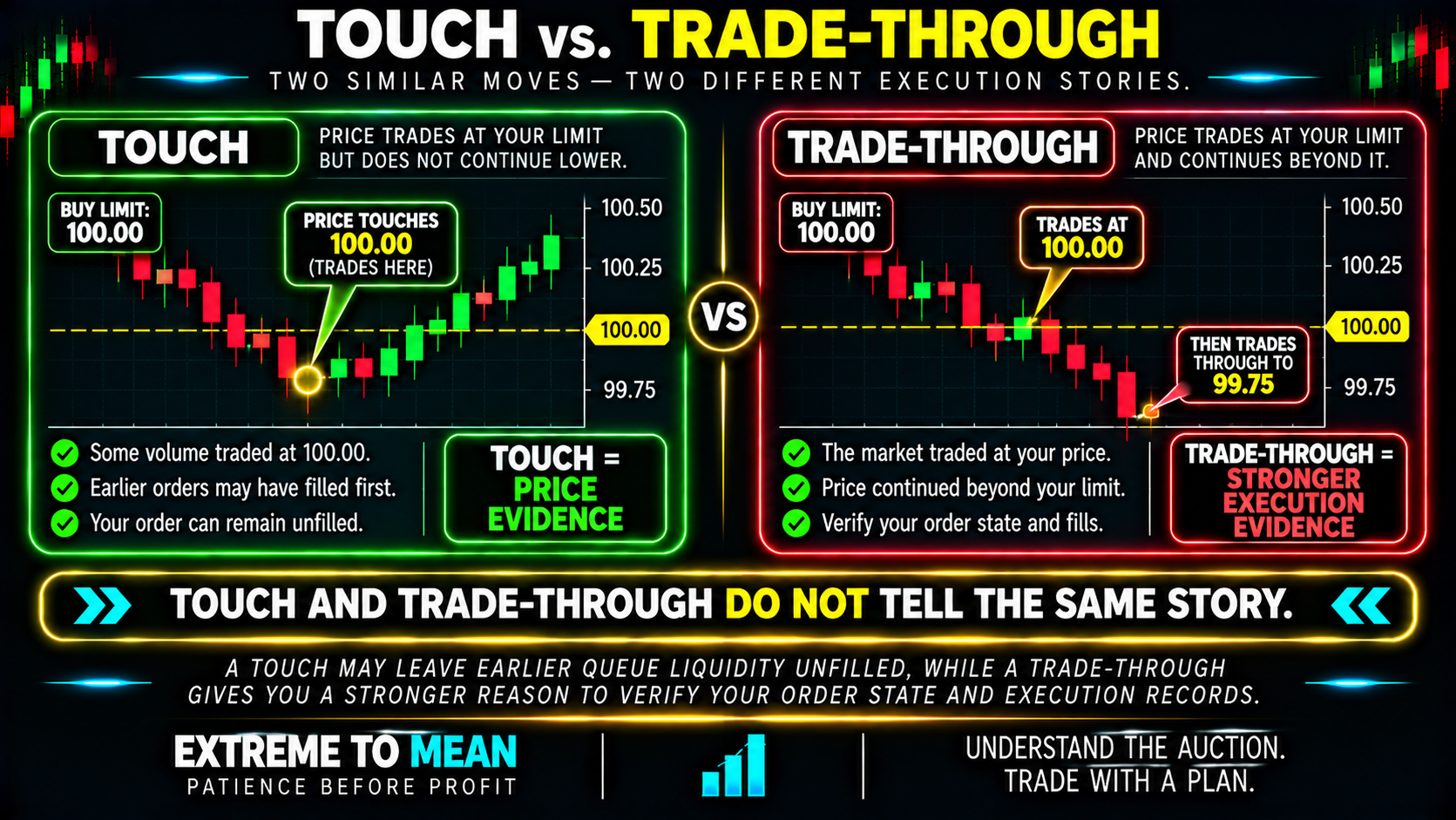
Trade-through should trigger verification, not accusation. Confirm the correct contract and venue, the order-acceptance timestamp, whether the order was still working rather than canceled or rejected, and the matching rules for that product. A trade-through is stronger execution evidence than a touch, but the actual order and execution records still matter.
Partial Fills and Order Changes
A limit order does not have to fill completely just because part of it traded. If you place ten contracts and enough opposing volume reaches only four before the market leaves, a four-contract partial fill can be normal. Larger orders also require more opposing volume before the entire position is completed.
A Limit Price Protects Price—Not Execution
A true limit order defines the worst acceptable execution price. A buy limit can execute at its limit or lower, while a sell limit can execute at its limit or higher; the tradeoff is that the order may not execute at all. LIMIT PRICE ≠ GUARANTEED EXECUTION.
A marketable limit can also fill at a better price than its limit. If a platform appears to show a true buy limit filled above its limit, verify the order type, contract, and actual execution record before deciding what happened.
The Candle May Show Prices From Before Your Order Existed
Bar aggregation creates another common illusion. Imagine a 10:00–10:03 candle whose low is 5,999.50, but your limit was accepted at 10:02:40 and that low occurred at 10:00:25. The completed candle still shows 5,999.50 even if the lowest trade after your order became active was 6,000.25.
The candle touched the price; the market did not touch it while your order existed. CANDLE LOW ≠ PRICE AFTER YOUR ORDER ARRIVED. The relevant market history begins when the order became active—not when the candle opened.
The instrument must match too. Around rollover, a continuous chart and a specific contract month can differ, so confirm that the chart and working order refer to the same actual contract.
Stop-Limit Orders Can Trigger Without Filling
A stop-limit contains a stop condition that activates the order and a limit that constrains acceptable execution. If a trader is long with a sell stop at 100 and a sell limit at 99.75, a fast move from 100 to 99.50 can trigger the stop while leaving the resulting limit unable to execute below 99.75. STOP TRIGGER ≠ STOP-LIMIT FILL.
That does not mean the trigger failed. The order can activate correctly and still fail to exit because activation and execution are different events. A stop-limit protects price by accepting no-fill risk, while other stop structures have different mechanics and should be evaluated according to the actual order type.
Why Simulation Can Look Cleaner Than Live Execution
Some simulators infer fills from historical price data using assumptions that do not reproduce actual queue competition. If a simulator treats touch as fill, the simulated trade can exist even though the live resting order never received enough opposing volume to reach its place in line. The simulator can award a fill from price history without competing for a real queue position.
That is one reason the backtest-to-live execution gap deserves separate review. A simplified fill model is not automatically wrong, but the trader needs to know what it assumes. Otherwise a strategy can appear to fail live when the signal stayed the same and the execution assumption changed.
The Limit-Order Fill Checklist
When the chart touches your price but you do not fill, ask:
- Was this the same futures contract, venue, and data source as the working order?
- Was the order already accepted and active when the relevant trades occurred?
- Did price merely touch the limit, or did the market trade through it?
- How much volume traded at the price after the order became active?
- How much eligible liquidity may have been ahead of the order?
- What matching algorithm applies to this product?
- Was the order partially filled?
- Was the order modified, canceled, replaced, rejected, or expired?
- Was it a true limit order or a stop, stop-limit, or other conditional order?
- If the market traded through an active limit, what do the actual order and execution records show?
This keeps the diagnosis mechanical. Start with execution evidence before assuming that a broker, platform, or exchange skipped the order. The better question is: What was the order's actual state and priority when executable volume arrived?
The ETM Price → State → Queue → Volume → Verify Framework
Use PRICE → STATE → QUEUE → VOLUME → VERIFY. PRICE asks whether the correct market really traded at the limit; STATE asks whether the order was accepted and active; QUEUE asks what priority or allocation conditions stood ahead of it. VOLUME asks whether enough opposing activity arrived, and VERIFY means reconciling actual records when the market genuinely traded through.
The possible outcomes are NORMAL / EXPLAINED / INVESTIGATE. A touch with insufficient volume can be normal, a timestamp or contract mismatch can explain the discrepancy, and an active order that remains unfilled through stronger execution evidence deserves deeper investigation. Start with execution mechanics before assuming execution failure.
The ETM free tools can support structured trade review, but the central habit is simpler: preserve timestamps and order records when something looks wrong. A screenshot of a completed candle is useful context; it is not a complete execution audit.
Final Thought
A futures limit order can remain unfilled even when a chart shows a trade at exactly your price. The chart proves that some participant traded there; it does not prove that your order was active in time, had priority, or received enough opposing volume to reach its place in the queue. TOUCH ≠ FILL, PRICE LEVEL ≠ QUEUE POSITION, and LAST TRADE ≠ BID / ASK.
First confirm the correct contract and order state, then compare trades after the order became active, distinguish touch from trade-through, and account for the product's matching rules. Remember that a true limit order protects execution price but not execution certainty, while a stop-limit can activate without filling. CANDLE LOW ≠ PRICE AFTER YOUR ORDER ARRIVED, LIMIT PRICE ≠ GUARANTEED EXECUTION, and STOP TRIGGER ≠ STOP-LIMIT FILL.
Seeing your price on a candle tells you where the market traded. It does not tell you where you stood in line when it got there.
Educational content only. Trading involves substantial risk and is not suitable for everyone.